How to Prevent Digital Eye Strain: Expert Tips for Long-Term Relief
In today’s hyper-connected world, it’s rare to go a day without staring at a screen. Whether you're working on a computer, scrolling through your phone, or binge-watching your favorite show, digital eye strain has become a common concern. The good news is that with the right strategies, you can protect your eyes and reduce discomfort effectively. This article will guide you through practical steps, expert advice, and lifestyle adjustments to keep your vision healthy and comfortable.
Understanding Digital Eye Strain
Digital eye strain, also known as computer vision syndrome, is a condition caused by prolonged use of digital devices. It occurs when your eyes work harder to focus on screens, especially those emitting blue light. Symptoms include dryness, blurred vision, headaches, and neck or shoulder pain. According to studies, the average person spends over six hours a day in front of screens, making this issue more prevalent than ever.
The causes are varied. Staring at screens for long periods reduces blinking, leading to dry eyes. Poor lighting, incorrect screen positioning, and uncorrected vision problems can all contribute. The good news is that many of these issues are preventable with small, consistent changes.
1. Follow the 20-20-20 Rule
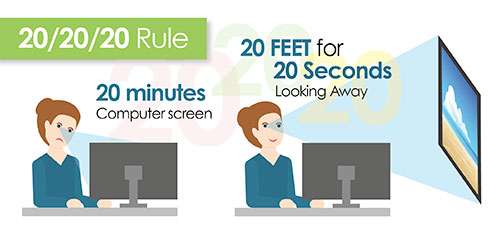
One of the simplest and most effective ways to prevent eye strain is the 20-20-20 rule. Every 20 minutes, take a 20-second break and look at something 20 feet away. This gives your eyes a chance to relax and refocus.
This technique works because your eyes’ ciliary muscles, which control focusing, get tired from constant close-up work. By shifting your gaze to a distant object, you allow those muscles to rest. You can even combine this with a quick stretch or a sip of water to make the break more refreshing.
2. Optimize Your Workstation Setup

Your workspace plays a significant role in how your eyes feel after a long day. Here are some ergonomic tips to consider:
- Screen Distance: Keep your screen about an arm’s length away (around 20–26 inches).
- Screen Height: Position the top of your monitor at or slightly below eye level to maintain a natural head position.
- Lighting: Avoid harsh overhead lights or direct sunlight behind your screen. Use soft, ambient lighting instead.
- Glare Reduction: Use anti-glare screen filters or adjust your screen’s brightness to match the room’s lighting.
These adjustments help reduce the physical stress on your eyes and body, making long hours in front of a screen more comfortable.
3. Adjust Screen Settings for Comfort

Your screen’s settings can significantly impact your visual comfort. Here are a few key adjustments:
- Brightness: Match your screen’s brightness to the ambient light in your room. A screen that’s too bright or too dim can cause strain.
- Text Size: Increase text size so you don’t have to squint. Most operating systems allow you to adjust text size easily.
- Blue Light Filters: Enable night mode or use apps like f.lux to warm up your screen’s color temperature, especially in the evening. This helps reduce eye fatigue and supports better sleep.
4. Practice Good Blinking Habits

When we’re focused on a screen, our blink rate drops by as much as 50%. This leads to dry, irritated eyes. Make a conscious effort to blink more often. You can also use artificial tears to keep your eyes moist throughout the day. Look for preservative-free options if you plan to use them frequently.
5. Incorporate Eye Exercises

Simple eye exercises can help relieve tension and improve focus. Try these:
- Focus Shifting: Hold a finger a few inches from your nose. Focus on it for a few seconds, then shift your gaze to a distant object. Repeat this 10–15 times.
- Palming: Rub your hands together to warm them, then gently cup them over your closed eyes for 30–60 seconds. This relaxation technique soothes tired eyes.
- Deliberate Blinking: Close your eyes, pause for a second, then open them. Repeat 5–10 times to re-moisten your eyes.
These exercises can be done quickly and easily during short breaks, helping you stay comfortable throughout the day.
6. Stay Hydrated and Eat Eye-Healthy Foods

Proper hydration is essential for maintaining healthy eyes. Drink plenty of water throughout the day, and consider adding green tea to your routine. It contains antioxidants that may help improve tear production.
Additionally, certain nutrients support long-term eye health. Include foods rich in lutein, zeaxanthin, omega-3 fatty acids, and vitamins C and E in your diet. Leafy greens, fatty fish, citrus fruits, and nuts are excellent choices.
7. Consider Blue Light-Blocking Glasses

While the scientific evidence on blue light’s direct impact on eye strain is still evolving, many people report feeling more comfortable wearing blue light-blocking glasses. These lenses reduce glare and may help improve contrast, making screens easier on the eyes. However, they should be used in conjunction with other strategies, such as proper screen distance and lighting.
8. Schedule Regular Eye Exams

Even with the best habits, underlying vision problems can worsen digital eye strain. Schedule regular comprehensive eye exams to ensure your prescription is up to date and any issues are addressed early. An optometrist can also recommend specialized lenses or coatings designed for screen use.
When to Seek Professional Help

If you experience persistent symptoms like headaches, blurred vision, or increased sensitivity to light, it may be time to consult an eye doctor. These could be signs of an uncorrected vision problem or another condition requiring treatment. Don’t ignore these signals—early intervention can make a big difference.
Final Thoughts
Preventing digital eye strain doesn’t require major lifestyle changes—it’s about building smart habits and making small, consistent adjustments. From following the 20-20-20 rule to optimizing your workspace and staying hydrated, there are numerous ways to protect your eyes. By taking these steps, you can enjoy your digital life without the discomfort of eye strain.
Remember, your eyes are one of your most valuable assets. Prioritizing their health ensures you can continue enjoying the benefits of technology without compromising your well-being. Start implementing these strategies today and take control of your visual comfort.

Post a Comment for "How to Prevent Digital Eye Strain: Expert Tips for Long-Term Relief"
Post a Comment